Creating Music Like Never Before: A Deep Dive into MuseScore 4


Introduction to MuseScore 4
MuseScore 4 marks a significant evolution in the realm of music notation software, catering to an array of users including composers, music educators, and enthusiasts. This powerful platform has garnered attention for its commitment to providing accessible, high-quality tools for music creation. The origins of MuseScore can be traced back over a decade, with its open-source nature allowing continuous enhancements and updates. Over the years, the software has evolved through multiple iterations, each introducing features that broaden the scope of music composition and arrangement.
With the release of MuseScore 4, users can expect a comprehensive overhaul of its interface and functionalities. The update reflects a shift towards a more user-centric design, aiming to simplify the music creation process. This presents a tangible refinement when compared to earlier versions, making it more intuitive for both seasoned professionals and novice composers. Notably, the integration of advanced playback features, an expanded sound library, and improved notational tools stands out in MuseScore 4. These enhancements not only elevate user experience but also significantly improve the quality and richness of the musical output.
Targeting a diverse audience, MuseScore 4 appeals to various demographics in the music community. Composers seeking robust tools to express their creativity can find inspiration in the vast capabilities offered. Likewise, educators can leverage these features to teach music theory and composition effectively. For music enthusiasts, the software serves as an engaging platform to explore their passion for music creation. In light of these developments, MuseScore 4 reaffirms its position as a leading choice for music notation software, facilitating a creative space for users to craft music like never before.
Key Features of MuseScore 4
MuseScore 4 introduces a range of innovative features designed to enhance the user experience and functionality for musicians of all levels. One of the most significant improvements is the refined user interface, which offers an intuitive and streamlined design. This adjustment allows users to navigate the software more easily, making the process of composing and arranging music less daunting for novices while providing experienced users with the efficiency they require.
Another noteworthy enhancement in MuseScore 4 is its updated music engraving capabilities. The software utilizes advanced algorithms to ensure that notation is not only visually pleasing but also conforms to professional standards. This enhancement is particularly beneficial for composers preparing scores for publication or performance, as it elevates the quality of the final output significantly.
Audio playback has also received a substantial upgrade in MuseScore 4. New sound fonts and improved synthesis techniques offer a more realistic auditory representation of compositions, aiding users in understanding how their music will sound in performance. This feature is particularly useful during the composition phase, helping to visualize the final product accurately.
Moreover, the integration of various plugins expands the capabilities of MuseScore 4 even further. Users can customize their workflow by incorporating additional tools and features that align with their specific needs, whether they are working on complex orchestral arrangements or simple melodies. This flexibility is one of MuseScore 4’s strengths, appealing to both amateur musicians exploring music creation and professional composers looking for a robust tool.
In summary, MuseScore 4’s key features, including an improved user interface, updated engraving, enhanced audio playback, and extensive plugin integration, position it as a versatile and powerful tool for music creation. This software effectively caters to a wide range of users, making it an excellent choice for anyone interested in composing or arranging music.
Getting Started with MuseScore 4
MuseScore 4 offers an excellent platform for music notation, enabling both beginner and experienced composers to create, edit, and share their musical scores effortlessly. The installation process is straightforward; users can download the latest version from the official MuseScore website, ensuring they have the most up-to-date features and improvements. Follow the instructions provided during installation, and soon you will be ready to explore this powerful software.
Upon launching MuseScore 4, you will encounter a user-friendly interface that streamlines navigation. The main toolbar provides easy access to essential tools for creating and editing scores, while the sidebar contains your score information, including instruments and parts. New users should take advantage of the tutorial prompts available upon initial launch to familiarize themselves with the layout and capabilities of MuseScore 4.
To create your first score, select ‘New Score’ from the file menu, and follow the score setup wizard. This wizard guides you through the process, allowing you to choose the ensemble or instrument for which you wish to compose. As you begin working, make use of the various notation tools available in MuseScore 4; options for note entry include mouse click, computer keyboard, or MIDI input, catering to your preferred method of composition.
Score playback is another critical feature, enabling you to listen to your compositions as you create them. The playback controls grant you the flexibility to hear sections of your score, making it easier to assess musical phrases and refine them as needed. For additional help, MuseScore 4 has a supportive community forum and extensive documentation available through their website, where users can ask questions and find resources to enhance their understanding of the software.
Tips and Tricks for Maximizing MuseScore 4 Experience
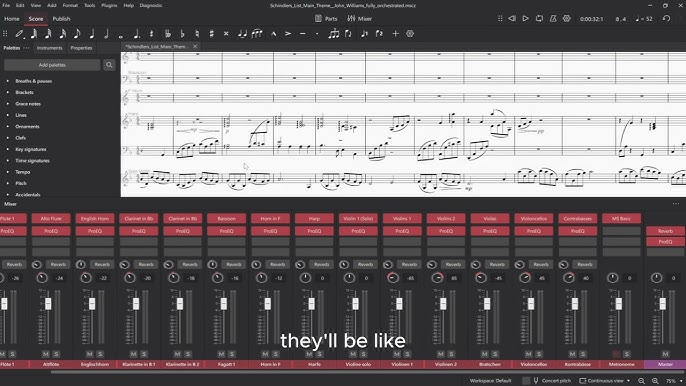
To get the most out of MuseScore 4, users should familiarize themselves with various features that enhance their music creation experience. One primary method for boosting efficiency is learning the keyboard shortcuts available in MuseScore 4. For instance, common tasks such as adding notes, adjusting dynamics, or even navigating sections can be performed significantly faster through keyboard commands rather than relying solely on mouse clicks. A list of all shortcuts can be found in the software’s documentation or by accessing the preferences menu.
Another effective strategy involves exploring the customization options within MuseScore 4. Users have the ability to tailor their workspace to fit their specific needs. This includes the arrangement of palettes, the use of custom templates, and the setting of default preferences which can save considerable time during the composition process. By organizing commonly used tools and templates, users can streamline their workflow, allowing for more focus on creative aspects of music composition.
Additionally, advanced techniques such as utilizing the program’s plugins can elevate the user experience in MuseScore 4. There are numerous plugins available that can add extra functionalities, ranging from automatic engraving adjustments to additional notation symbols. Engaging with the plugin community not only offers new tools but can also inspire fresh ideas for projects.
Finally, one of the most valuable resources for MuseScore 4 users is the online community. The forums and user groups provide a platform for sharing compositions, receiving constructive feedback, and exchanging tips with fellow musicians worldwide. Engaging with this global network not only fosters collaboration but can also lead to new opportunities and inspiration as users navigate their musical journeys.